Part 1 — What Alumina Classification Actually Means
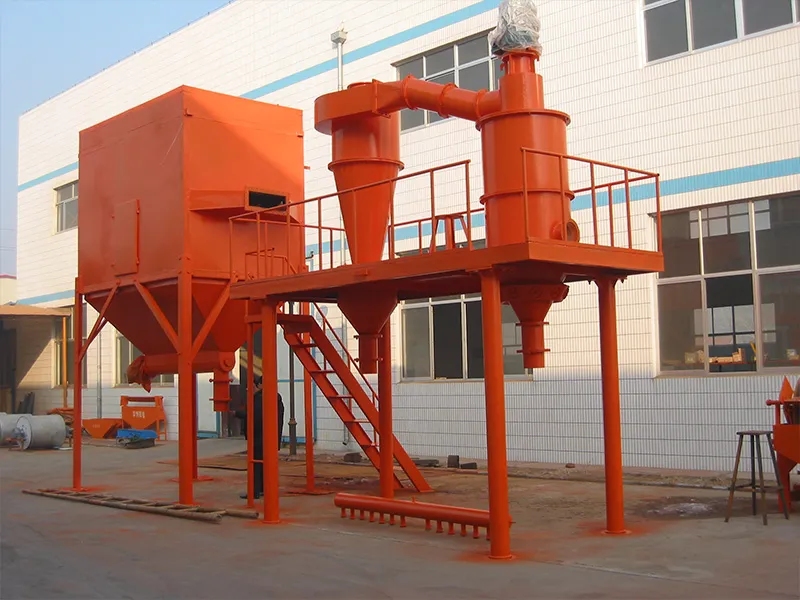
Aluminium oxide (Al₂O₃) is never a single product. The same chemistry can go into a ceramic body, a polishing abrasive, a thermal filler or a refractory castable, but each application needs a completely different particle size range. Alumina classification is the dry separation step that sorts ground alumina into fractions with a defined top cut and median. The goal is simple: ship the grade the customer ordered, not an unsorted mix.
The three numbers that define your grade
Every classification result comes down to three parameters from a laser-diffraction PSD report:
D50 (median) — 50% of the particle volume is finer than this size. The headline number for a grade.
D97 (top cut) — 97% of the volume is finer than this size. This is where the coarse tail stops. For polishing and advanced ceramics, D97 matters more than D50. A single coarse particle can leave a scratch on a polished surface or create a defect in a sintered body.
Span = (D90 − D10) ÷ D50 — the width of the distribution. A smaller Span means a narrower, more uniform product. Two batches can share the same D50 and behave completely differently if one has a Span of 1.3 and the other 2.5.
Quick reference: typical alumina size ranges by application
| Application | Typical D50 range | Typical D97 target |
| Advanced ceramics (sintered) | 0.3 – 3 µm | ≤ 5 – 10 µm |
| Fine polishing / lapping | 1 – 10 µm | ≤ 15 – 25 µm |
| Thermal interface filler | 2 – 20 µm | ≤ 30 – 45 µm |
| Refractory castables (fine fraction) | 5 – 45 µm | ≤ 75 – 100 µm |
| Refractory aggregates (coarse) | 50 – 500 µm | ≤ 1 – 2 mm |
How to use this table: find your application in the left column, then read across for the D50 and D97 ranges typical for that market. Pick a specific number within those ranges as your target, so the classifier operator has a clear aim point.
How an air classifier sets the cut point
Inside the classifier, feed enters a rotating wheel. Centrifugal force throws coarse particles outward. A controlled jet pulls fine particles through the wheel and out as product. The cut point is adjusted with two controls: raise the rotor speed and the cut gets finer. Raise the air flow and it gets coarser. Neither setting is fixed. You adjust both until the measured D50 and D97 match your target.
Part 2 — Two Common Questions (and What to Do About Them)
Q1: The feed is labelled “25 µm,” but the measured D50 is 8.4 µm. Which number should I trust?
Both numbers are real. They describe different things. “25 µm” on the feed label is a nominal sizing. It can be a fraction name, a cyclone setting, or the supplier’s internal grade code. It does not guarantee the median is 25 µm. The measured D50 of 8.356 µm is what a laser-diffraction analyser actually sees in the product.
What to do: always go by the measured D50, D97 and Span. If you are buying alumina, write the PSD targets into the purchase spec. If you are producing it, sample every batch and plot the trend.
Q2: Span came out at 1.405. Is that acceptable, and how do I tighten it?
Span is relative, lower means narrower, and for most technical aluminas a narrower distribution is better. A Span of 1.405 means D90 and D10 sit close to the median rather than trailing into a long coarse or fine tail. Whether it is acceptable depends on your end use.
If you need a tighter cut, the four most effective levers are:
- Raise rotor speed. This pushes the cut finer and sharpens the top end, but may reduce throughput.
- Lower feed concentration. Less material in the classifying zone means each particle sees a cleaner separation. This is often the single biggest improvement.
- Improve dispersion at the feed point. Agglomerates entering the classifier behave like coarse particles. A dispersing nozzle or a pre-dispersion step can help.
- Add a second classification pass. Run the fine fraction through a second stage at a slightly tighter setting.
Watch out: if you raise rotor speed without adjusting feed rate, the classifier can overload and Span may actually get worse. Change one variable at a time and measure the result before changing the next.
Part 3 — What Tight Classification Gives You
Adding a classifier to your alumina process line changes four things that affect your bottom line:
Fewer customer returns. Controlling D97 keeps oversize particles out. In polishing, a single 30 µm particle in a nominally 10 µm grade can leave a visible scratch on the workpiece. In ceramics, coarse outliers cause sintering defects. Keeping D97 in check is the cheapest way to cut returns.
Predictable downstream behaviour. When D50 and D97 stay within a narrow band, sintering shrinkage, polishing finish and filler loading become repeatable from batch to batch. Your customer’s process stops drifting.
Higher usable yield. The classifier extracts the on-spec fraction and returns oversize to the mill. You stop grinding the whole batch to the finest particle. You only re-grind what needs it.
A documented quality record. Classification paired with laser-diffraction measurement gives you a PSD report per batch. This is the evidence customers ask for and what ISO audits want to see. If a quality complaint comes in, you can trace it back to a specific batch in minutes.
Part 4 — How to Classify Alumina, Step by Step
Write down your target distribution
Start from the application. For a fine ceramic grade, a D97 in the low tens of microns and a D50 in single digits is typical. For coarser refractory fractions, the targets move up. Pick three numbers: D50, D97 and the maximum Span you will accept. Without a written target, you cannot tell whether the classifier is actually doing its job.
Match the classifier to your D97 target
Every machine has a working range. The multi-rotor air classifier (HTS) covers D97 ≈ 3–45 µm for fine and ultra-fine grades. The air classifying unit (ITC) handles D97 ≈ 5–200 µm for the mid-range. The centrifugal classifier (CTC) or MBS powder separator covers coarser cuts. Pick a machine whose range brackets your target so you are not running at the edge of its capability.
Set rotor speed and air flow, then measure
Rotor speed is adjusted via inverter; pair it with the air-flow setting to place the cut point on your target D97. Start from the machine’s recommended settings for alumina, then sample, measure the PSD, and iterate. Don’t trust the first setting. The only way to confirm the cut is to measure the particle size distribution.
Control feed rate and dispersion
A steady, well-dispersed feed keeps the classifying zone stable. Too high a feed concentration crowds the wheel and widens the Span. Too low wastes capacity. Hold rotor speed constant and run a short trial at three different feed rates, measuring Span at each one. Pick the rate that gives the lowest Span without dropping below your throughput requirement.
Close the loop with the mill
Take classifier output as product; return the coarse fraction to the mill for re-grinding. This prevents over-grinding the whole batch and keeps the circuit on-spec. A closed loop also means the classifier sees a more consistent feed, which makes the cut more stable.
Measure every batch and track the trend
Sample the product, run a laser-diffraction PSD, and record D50, D97 and Span. Compare to target. If D97 starts drifting upward, check rotor speed and air flow. If Span starts widening, check feed concentration and dispersion. Plot these three numbers over time and you will spot when the classifier needs maintenance before the product goes out of spec.
The first parameter to check when Span drifts: feed concentration. On most alumina lines, a widening Span comes from too much material entering the classifying zone at once, not from a mechanical problem with the rotor.
Part 5 — What Real Results Look Like
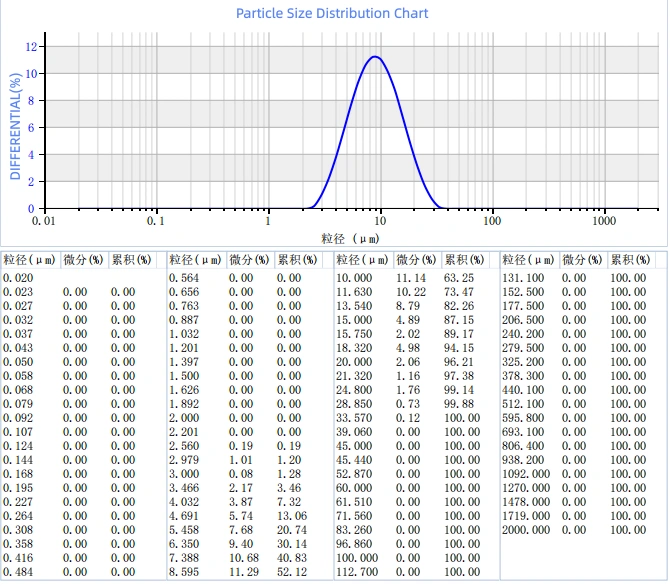
The data below is from a typical classified alumina batch, measured on an OMEC Topsizer laser-diffraction analyser (a Malvern Panalytical brand). Actual results vary with feed material, classifier settings and process conditions. This example shows what a well-tuned cut looks like.
Result 1 — Cut point: D50 and D97 on target
| Parameter | Measured value |
| D10 | 4.354 µm |
| D50 (median) | 8.356 µm |
| D90 | 16.096 μm |
| D97 | 20.846 µm |
| D100 | 33.158 µm |
Starting from a feed fraction labelled “25 µm cyclone material,” the classified product measured a D97 of 20.85 µm and a median of 8.356 µm. The top cut landed below the nominal feed size, and the median moved into the single-digit range. For fine polishing or mid-range ceramic applications, this is a usable distribution: the coarse tail is cut off, and D50 sits where the process needs it.
Result 2 — Distribution width: Span at 1.405
| Parameter | Measured value |
| D(3,2) | 7.418 µm |
| D(4,3) | 9.443 µm |
| Span | 1.405 |
| Weight-specific surface area | 299.566 m2/kg |
D90 and D10 stayed close to the median (Span = 1.405), without trailing into a long tail. A narrow distribution means the powder packs, sinters and finishes the same way every time. The weight-specific surface area of 299.6 m2/kg follows from the same distribution — useful if your customer’s spec references surface area rather than particle size.
Result 3 — A number worth watching: the gap between D(3,2) and D(4,3)
In this batch, D(3,2) = 7.418 µm and D(4,3) = 9.443 µm. D(3,2) is the surface-area-weighted mean; D(4,3) is the volume-weighted mean. When D(4,3) is larger than D(3,2), the distribution has a coarse-side tail. The gap here is about 2 µm, which is modest — the classifier is doing a clean job. If the gap keeps widening over successive batches, that is an early sign coarse particles are bleeding through. Check the rotor seal or air-flow balance before the D97 starts to drift.
Have an alumina grade with a target D50/D97? Tell us the distribution you need and your current feed — our engineers can recommend a suitable classifier from the HTS, ITC, CTC or MBS ranges. Contact EPIC Powder Machinery.
Epic Powder
Epic Powder, 20+ years of experience in the ultrafine powder industry. Actively promote the future development of ultra-fine powder, focusing on crushing, grinding, classifying and modification process of ultra-fine powder. Contact us for a free consultation and customized solutions!

“Thanks for reading. I hope my article helps. Please leave a comment down below. You may also contact EPIC Powder online customer representative Zelda for any further inquiries.”
— Jason Wang, Engineer